How to Make a Stonecutter in Minecraft

Are you tired of manually wasting stone and suffering through complex crafting table recipes just to make a few stairs or slabs? Stop throwing away half your valuable materials. The Stonecutter in Minecraft is the single most efficient block for all your masonry needs and is about to become your new best friend in the game.
The Stonecutter is a powerful utility block that acts as a dedicated station for all stone block types. It simplifies many complex shapes and recipes, allowing you to create beautiful, intricate stone variants with speed and minimal resource waste. This tool is truly a must-have for all serious builders.
This efficient block is useful for two main reasons. It is an incredible resource saver, capable of cutting a full block of stone into up to four stone slabs with zero leftovers. Furthermore, it serves as the necessary job site block that turns a jobless villager into a skilled Stone Mason.
What Is a Stonecutter in Minecraft?
The Stonecutter in Minecraft is a very special machine, or block, that you can place in your world. Its main job is to help players cut and create many different stone variants and shapes quickly and efficiently.
The most important thing to know is that the Stonecutter is much better than the standard crafting table for stone. It lets you take one full block of material and cut out perfect shapes, like one stair or four stone slabs, without wasting any leftovers.
This tool is useful for two major reasons. First, it simplifies the crafting of detailed stone items like stone bricks and polished blocks. Second, it is the only way to get a Stone Mason villager, which makes it a crucial job site block for your village
Materials required to craft a Stonecutter
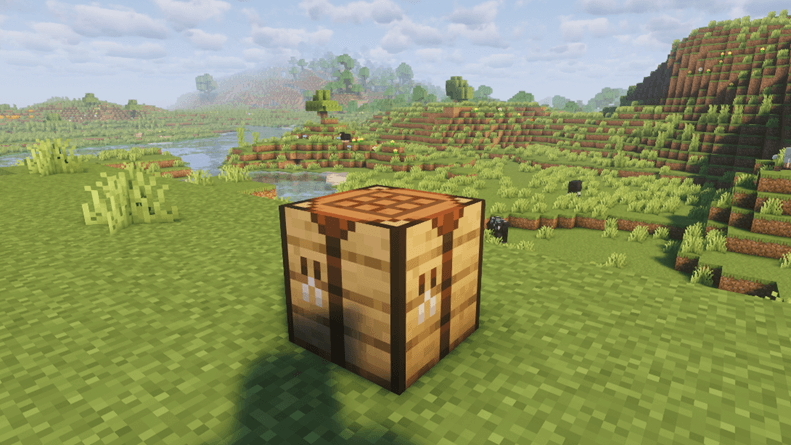
To craft a stonecutter, you need only two key materials and your crafting table to combine them.
| Item | Quantity | Source |
|---|---|---|
| Iron Ingot | 1 | Smelting Iron Ore |
| Stone Block | 3 | Smelting Stone |
You obtain the required iron ingot by placing raw iron ore in a furnace and completing the smelting iron ore process with a fuel source. For the necessary stone block, you must first smelt regular cobblestone into stone in a furnace to create the smooth stone.
You can later use the Stonecutter to cut stone variants like stone bricks, cut red sandstone, or the new cut copper from copper blocks.
Stonecutter Crafting Recipe
The Stonecutter has a simple and consistent crafting recipe that is easy to remember across all current versions of Minecraft.
- Open your crafting table menu.
- Place one iron ingot in the center box of the top row of the crafting table.
- Place three stone blocks of smooth stone directly below the iron ingot. This fills the entire bottom row of the 3x3 grid.
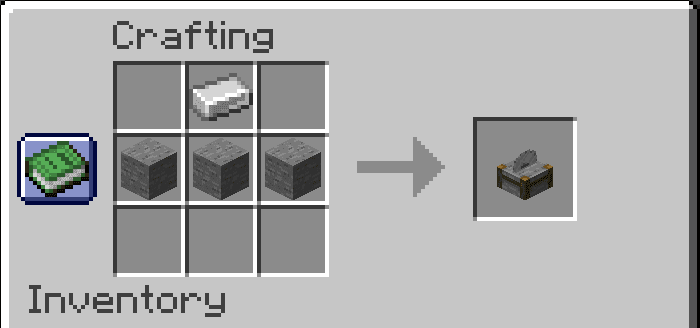
The final Stonecutter block will appear in the output slot, ready to be collected. The item is the new stonecutter, which holds the same name as the older, removed version.
How to Use a Stonecutter in Minecraft
Using the Stonecutter is very simple once you have finished crafting it. First, place the Stonecutter block down on the ground where you want to work.
To open the menu, simply right-click on the block. The screen that pops up is your Stonecutter interface. You will see one input slot and a long list of options on the side.
To begin, place your particular material (like a stone block or sandstone) into the input slot. As soon as you do this, the block selection menu on the side will show you all the stairs, slabs, and other shapes you can create from that material.
This simple process of putting in one block and choosing your shape is the key difference from the complex crafting table. The Stonecutter handles the precise cutting for you.
Using the Stonecutter to Make a Stone Mason
The Stonecutter has a very important job in your village, beyond just helping you craft stone. It serves as a dedicated job site block for villagers who do not have a profession.
If you place the Stonecutter near any jobless villager, that villager will claim the block and automatically become a Stone Mason. This is the only way to get a Stone Mason villager in Minecraft.
Once the villager has this job, they will offer valuable trades for many decorative blocks and stone items, including polished stone and stone bricks. This makes the Stonecutter useful for builders even if you do not use it for cutting your own materials.
Stonecutter Variants and Editions
The basic job of the Stonecutter is the same whether you play on Java Edition or Bedrock Edition. The way it works shows similar functionality across both versions of the game.
However, there are small, historical differences. Very old Minecraft Pocket Edition versions used to have an old stonecutter which was a completely separate block that did not work as well.
When the new stonecutter was added, it replaced that old version. Today, the main thing to remember is that while the Stonecutter is mostly uniform, its behavior with special block states might be slightly different depending on your edition.
Visuals and Textures
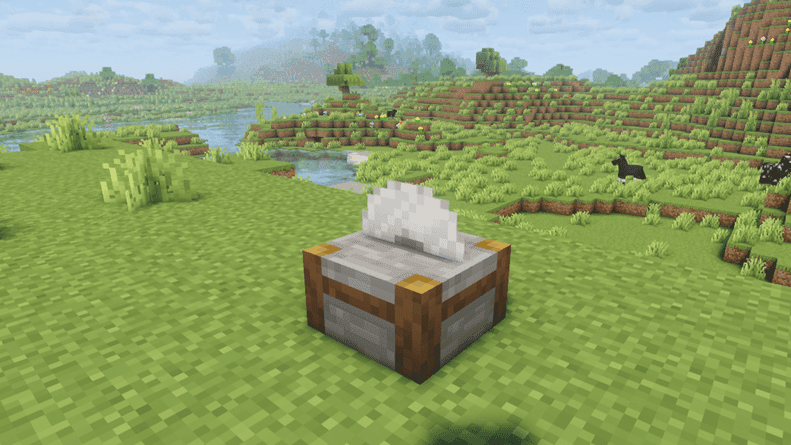
The Stonecutter has a unique look that makes it easy to spot among your other crafting blocks. The Stonecutter block has a sturdy stone base on the bottom.
On the top surface, you will see a round, circular iron blade that appears ready to cut. The sound the block makes when you use it is similar to a bass drum, and the saw texture on the side also helps you identify it.
When you open the menu, the iron blade appears to be spinning rapidly. This movement is a nice visual detail that separates this specialized working block from a regular crafting table.
Crafting Possibilities
The Stonecutter menu is full of craftable blocks you can make from stone and other similar materials you find in your world. This tool simplifies crafting certain blocks into stairs, smooth stone slabs, and polished slabs.
You can cut stone from many types, including the basic stone block, sandstone, cut red sandstone, different cut copper blocks, and even end stone. It allows you to use different variants interchangeably when you are cutting, which is easier than using the crafting table.
Clarify limitations: The Stonecutter is only for decorative blocks. It cannot be used to craft stone tools, weapons, or other complex items. It is strictly for cutting building blocks.
Tips and Tricks
These tips help you get the maximum benefit, efficiency, and use out of your Stonecutter block, focusing on resource management and building speed.
- Zero-Waste Efficiency: Always use the Stonecutter to craft stairs and stone slabs. It converts one full block of material (like stone or quartz) into a stair or four slabs with absolutely zero resource waste, which is superior to the crafting table ratio.
- Faster Mass Production: If you need to transform a large number of stone blocks into stone bricks or cut red sandstone, the Stonecutter is faster than repetitive manual crafting. Its simple, direct interface saves clicks and time.
- Instant Recipe Guide: You never need to check external resources for certain recipes. Just place the particular material (like end stone or copper blocks) into the slot, and the block selection menu will immediately show all possible shapes you can make.
- Villager Job Strategy: To instantly make a Stone Mason, place the Stonecutter near an unemployed villager. The villager claims the job site block almost instantly, allowing you to access trades for decorative blocks faster.
- Non-Full Block Status: Due to its simple, thin shape, the Stonecutter is useful in tight building spots or specific Redstone contraptions where a full-sized block would interfere. It offers unique vertical placement opportunities.
- Universal Input: The Stonecutter handles every type of stone (smooth stone, diorite, granite, etc.) and similar materials like prismarine. It allows you to use all these variants interchangeably in its menu.
Conclusion
The Stonecutter is a compact, efficient, and essential working block for every serious builder in Minecraft. It is a necessary tool that allows you to easily craft detailed stone items like stone bricks and smooth stone slabs without wasting material.
Its dual role as a specialized crafting tool for players and a villager job site block for the Stone Mason makes it an invaluable addition to any survival world. We strongly encourage you to try it in both Java and Bedrock editions right away to see how efficient it is for yourself.
FAQS
What is the Stonecutter recipe again?
The Stonecutter requires one iron ingot in the top center and three stone blocks of smooth stone placed in the bottom row of your crafting table.
Can the Stonecutter craft tools?
No, the Stonecutter can only be used to craft various stone variants into cut stone items like slabs and stairs; it cannot craft stone tools.
Does the Stonecutter save materials?
Yes, it is much more efficient than manual crafting for stairs and other complex shapes, allowing you to get a stair or a two-stone slab from a single full block of stone.
What villager job uses the Stonecutter?
The Stonecutter is the dedicated job site block that turns an unemployed villager into a Stone Mason (or Mason), giving the same name across editions.